What do you need help with?
Start with the task below. If you contact us, a little context helps us understand the problem. Your licence key is never needed in an email.
Sales are not open yet. Purchase delivery and licence help below describe the intended customer flow.
01Install & launchInstaller, Windows prompts and first launch
After sales open, use the current installer delivered through your order. Pro installs per user and may download the WebView2 bootstrapper.
If a Windows security prompt differs from the release guidance, stop and contact support; do not follow generic bypass steps.
Read the setup guide →02Licence & activationFind your key, activate, or move devices
One licence is intended for up to 3 devices. Stripe keys arrive in a separate licence email; the Stripe payment receipt does not contain the key. Stripe desktop activation and a compatible installer are not available yet. Lemon Squeezy customers should continue using their existing order and compatible app.
In a compatible app, open Settings and choose Deactivate this device before activating a new PC. If a device is inaccessible or the device limit is reached, contact support@adamj.link. A self-service reset is not currently available.
Never send your licence key to support.
Read activation steps →03Using ProAdjust text, preview, undo and restore
Pro adjusts title bars, menus, message boxes, desktop/icon labels and status text. Preview is illustrative.
Follow the visual guide to choosing sizes, previewing and saving presets
Three ways to return to earlier sizes
- Undo reverses one recent operation in the current app session. It is unavailable if there is no change to undo.
- History records applied changes. Choose Restore these sizes beside the state you want, then confirm.
- Restore originals returns all five areas to the values captured before your first applied change, after confirmation.
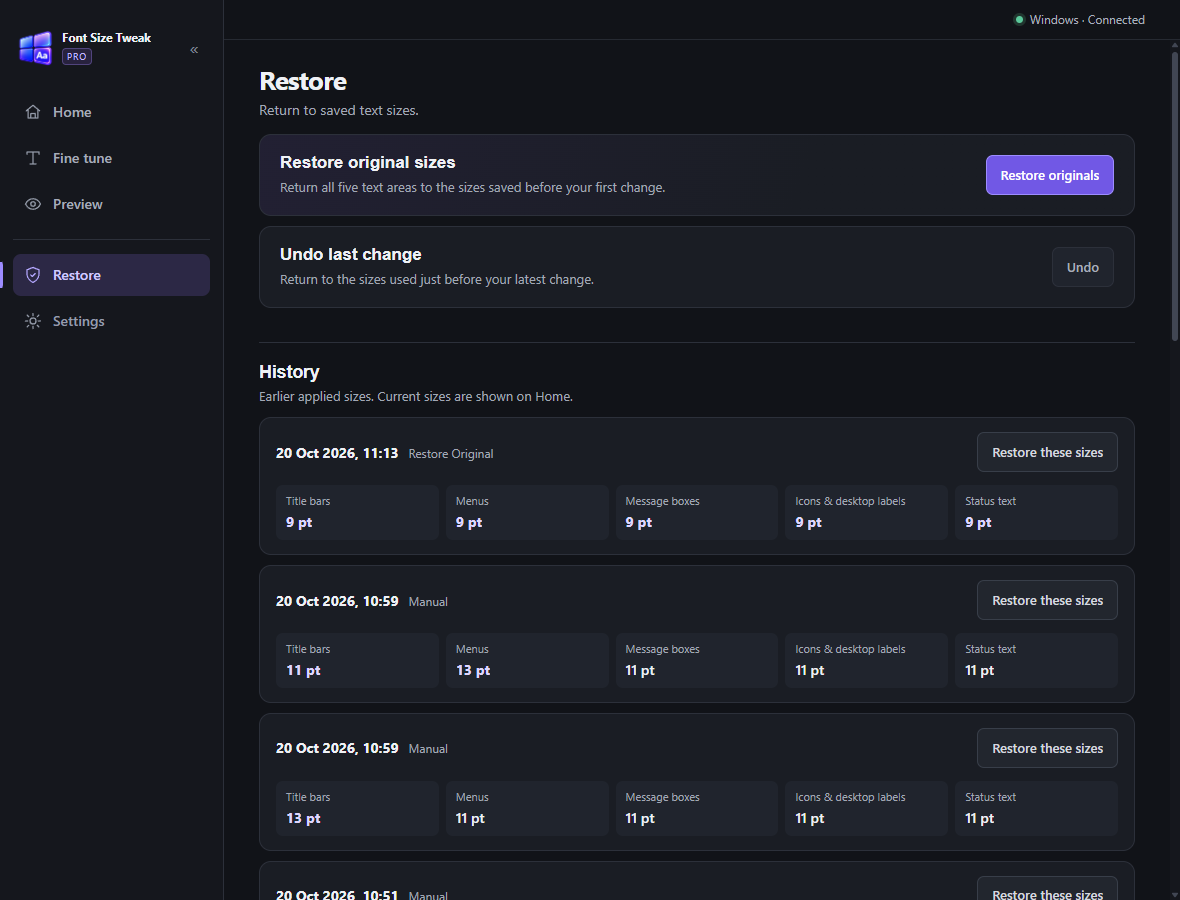
A selection stays pending until you choose Apply changes. Choose Discard to abandon it. Some Windows surfaces need a sign-out and sign-in to refresh.
Read the adjustment guide04CompatibilitySupported Windows versions and text areas
Windows 10 and 11 are the intended platforms. Pro adjusts supported classic Windows text metrics, not overall display scaling. Newer surfaces and individual apps may render differently or ignore these metrics. Some changes may need sign-out and sign-in to refresh.
See the five supported areas →05UpdatesGet the latest installer or reinstall
In-app updates are not available yet. Get the latest full installer from your order; no automatic update checking or installation is promised.
Read reinstall guidance →06DiagnosticsReview information before sharing
The app creates its compatibility report locally. It includes app and Windows versions/build, supported-metric states, and whether local profiles, history and Original backup are present. It omits username, device name, personal path and telemetry identifier.
Copying is your choice. Review the report and remove anything you do not want to share. It does not include your licence key.
Still need help?
Tell us what you were trying to do, plus your app and Windows versions. A reviewed diagnostics report can help when relevant.
Never include your licence key.